Chapter 3 · अध्याय 3
Build your menuअपना मेन्यू बनाइए
- Find Menu StudioMenu Studio कहाँ है, यह जानिए
- See and edit your sections and dishesसेक्शन और डिश देखिए और बदलिए
- Add a new dish by handहाथ से नई डिश जोड़िए
- Turn a printed menu into a digital one with photosफ़ोटो से छपे मेन्यू को डिजिटल बनाइए
- Publish so guests see the latest menuपब्लिश कीजिए ताकि ग्राहक नया मेन्यू देखें
STEP 1 · चरण 1
Open Menu StudioMenu Studio खोलिए
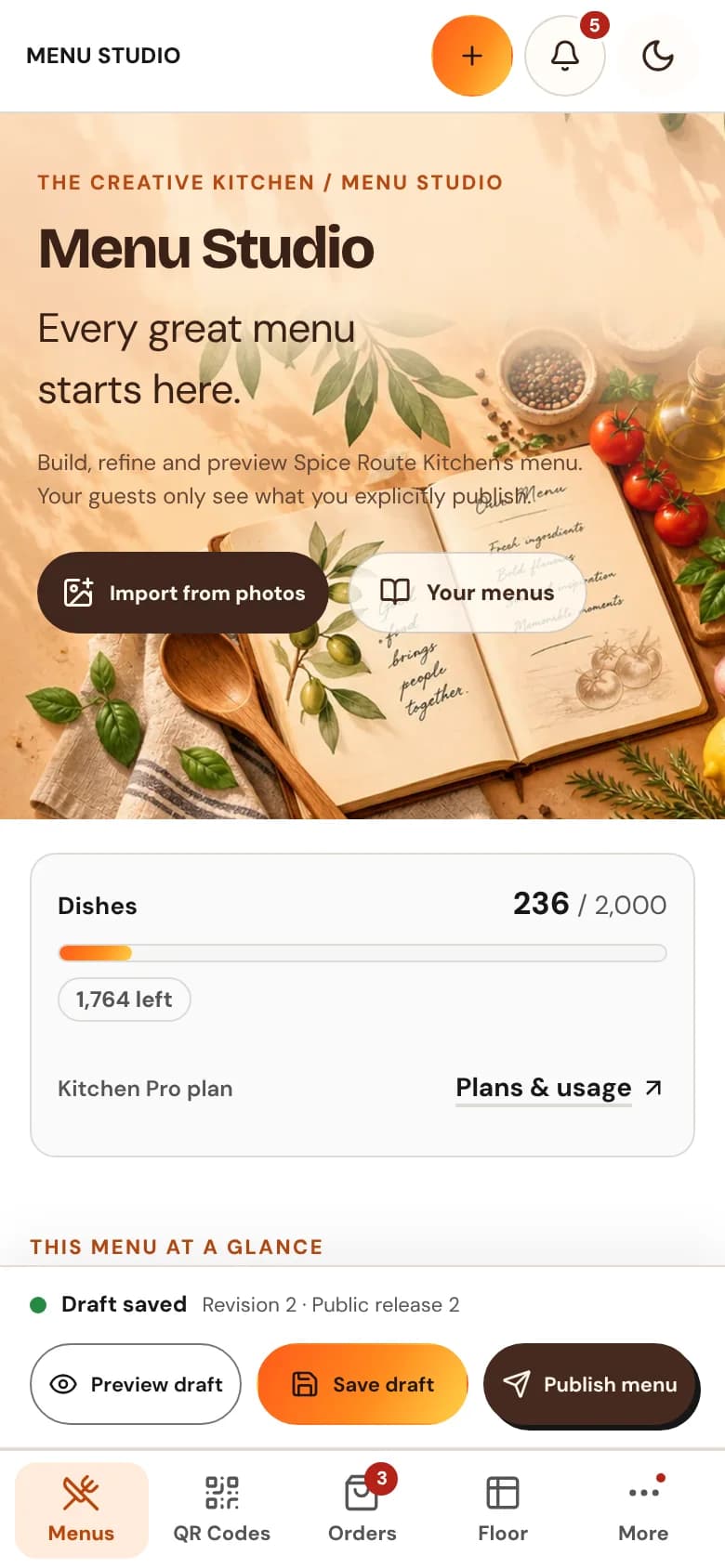
Menu Studio is where your menu lives. Everything in this chapter happens here.Menu Studio वह जगह है जहाँ आपका मेन्यू रहता है। इस चैप्टर का सारा काम यहीं होता है।
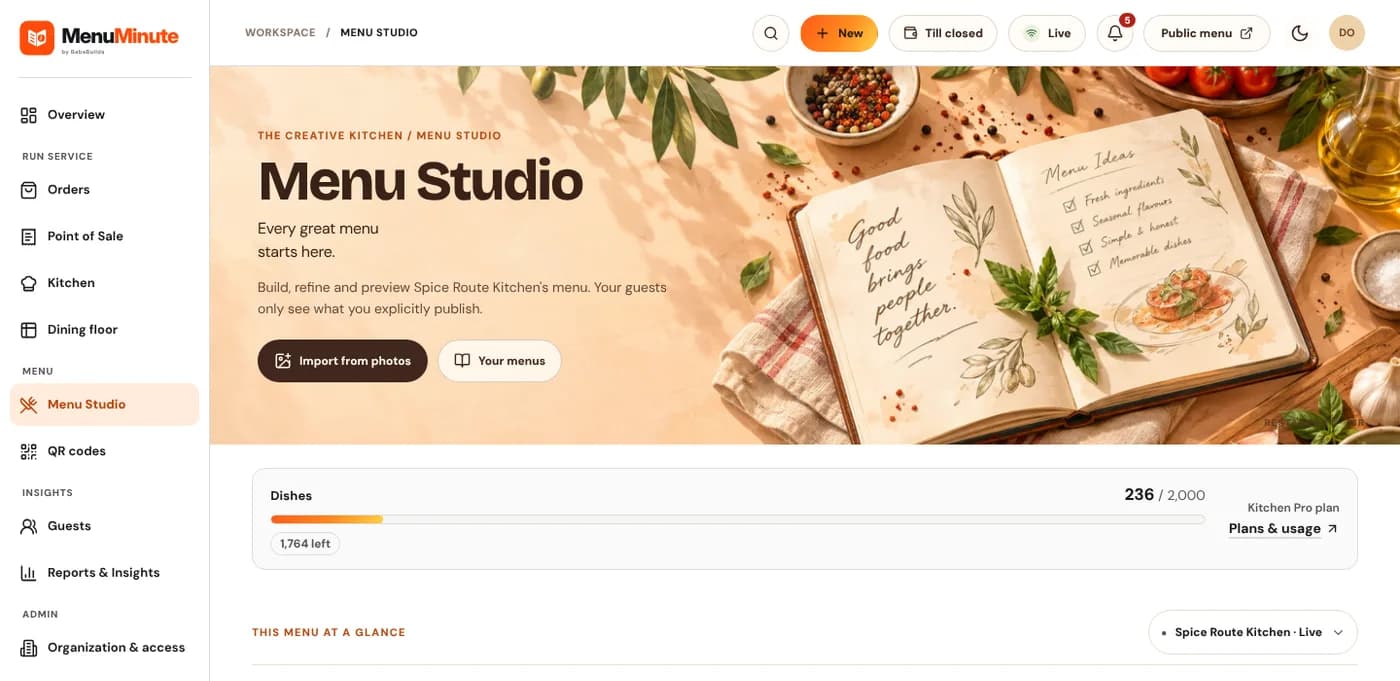
- 1On a computer, click Menu Studio in the left menu.कंप्यूटर में, बाईं तरफ़ के मेन्यू में Menu Studio पर क्लिक कीजिए।
- •On a phone, tap Menus at the bottom of the screen.फ़ोन में, स्क्रीन के नीचे Menus पर टैप कीजिए।
STEP 2 · चरण 2
See your sections and dishesअपने सेक्शन और डिश देखिए
Your menu is split into sections, such as Starters or Breads. Each section holds its dishes.आपका मेन्यू सेक्शन में बँटा होता है, जैसे Starters या Breads। हर सेक्शन में उसकी डिश होती हैं।
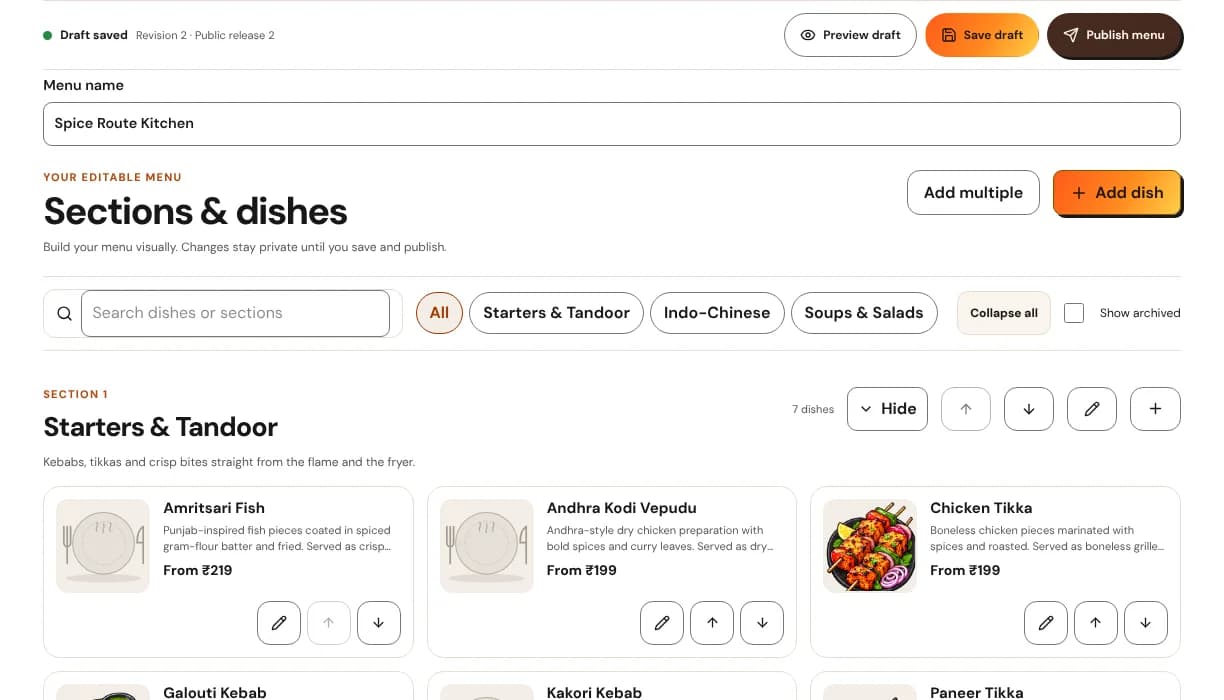
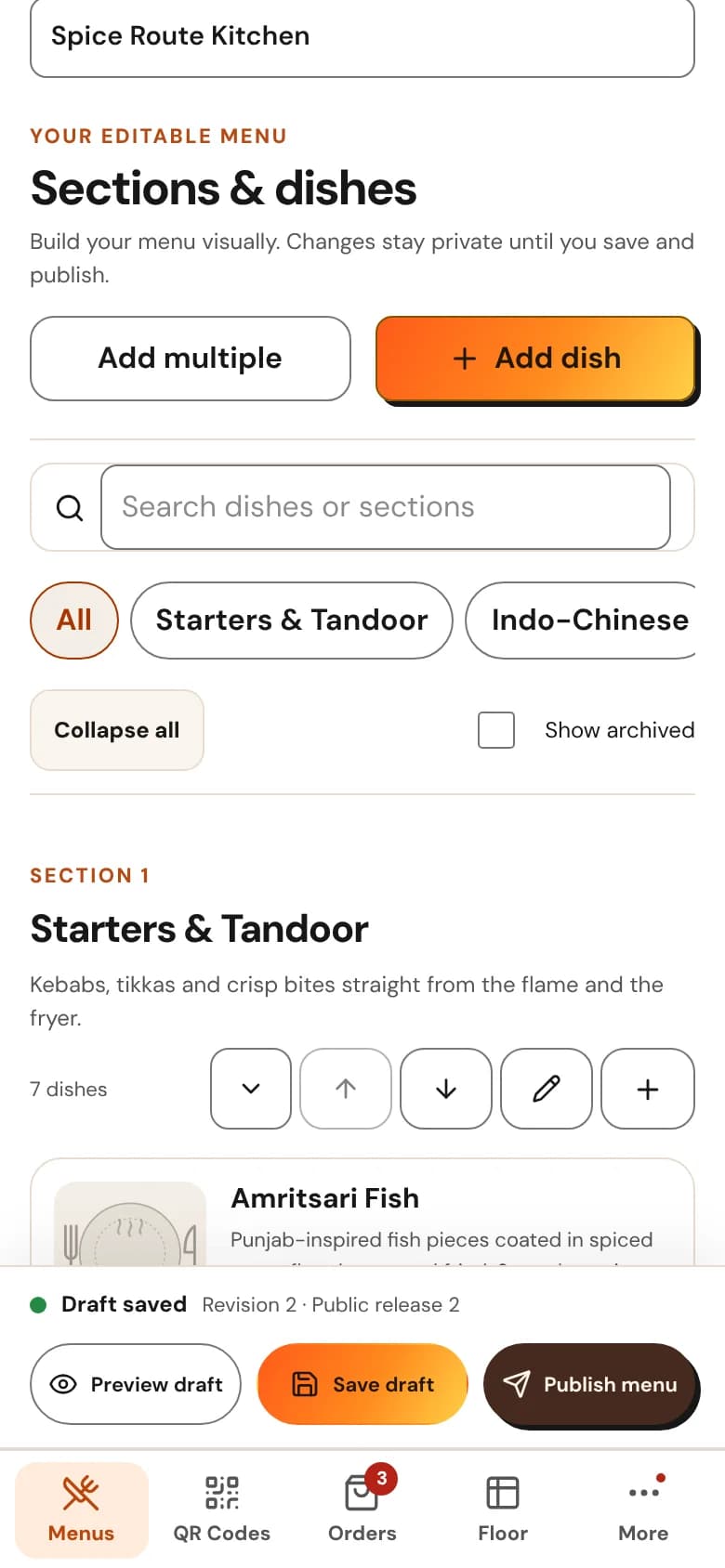
- 1Type a name in the search box to find a dish quickly.कोई डिश जल्दी ढूँढने के लिए Search बॉक्स में उसका नाम लिखिए।
- 2Click Add dish to add something new.नई डिश जोड़ने के लिए Add dish पर क्लिक कीजिए।
- 3Click the pencil on a dish to change its name, price or description. The arrows move it up or down.किसी डिश का नाम, कीमत या डिस्क्रिप्शन बदलने के लिए पेंसिल पर क्लिक कीजिए। तीर वाले बटन से डिश ऊपर-नीचे होती है।
STEP 3 · चरण 3
Add a dishनई डिश जोड़िए
A small panel opens on the right. Fill in the name and price, and you are done.दाईं तरफ़ एक छोटा पैनल खुलता है। नाम और कीमत भरिए, बस हो गया।
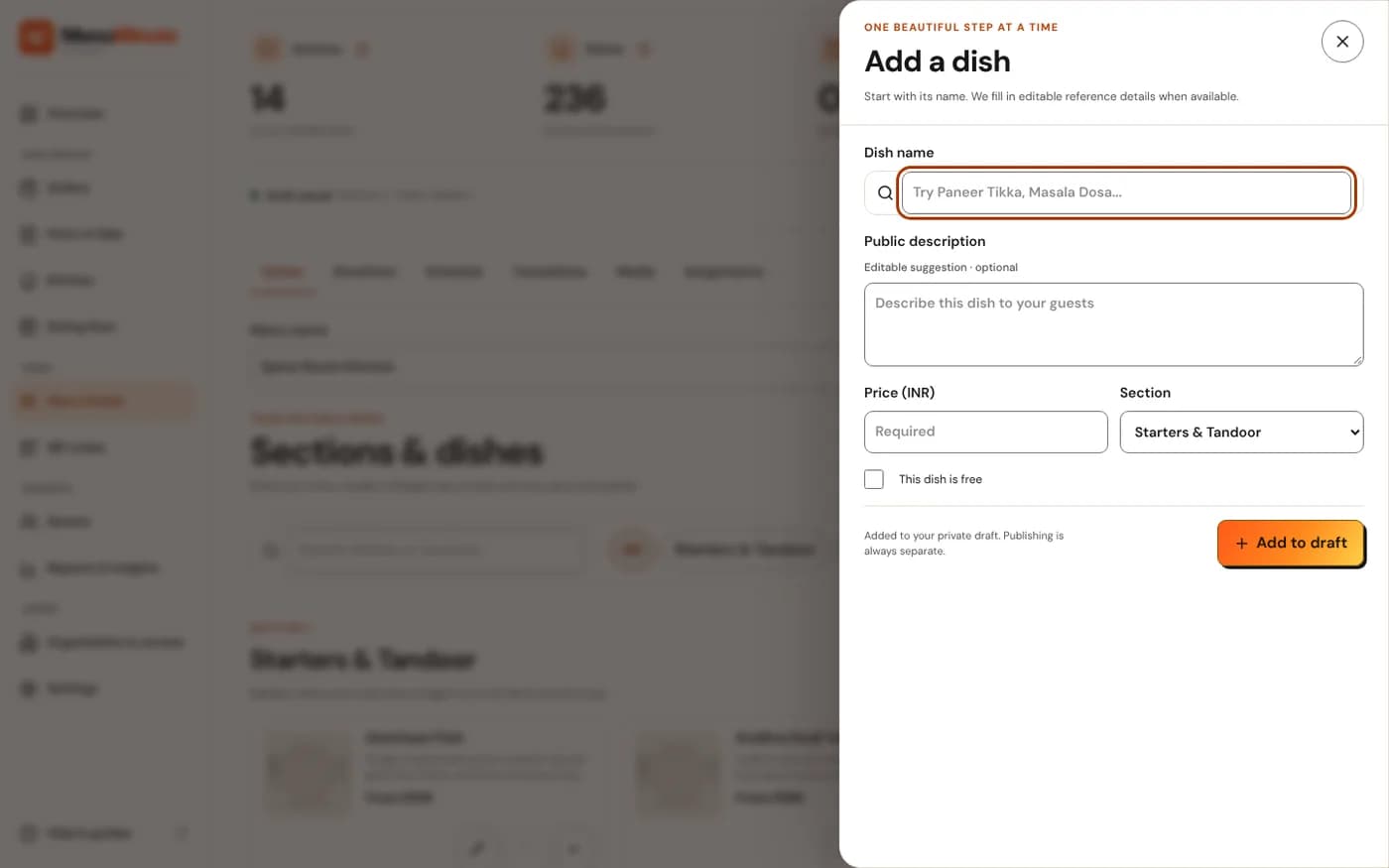
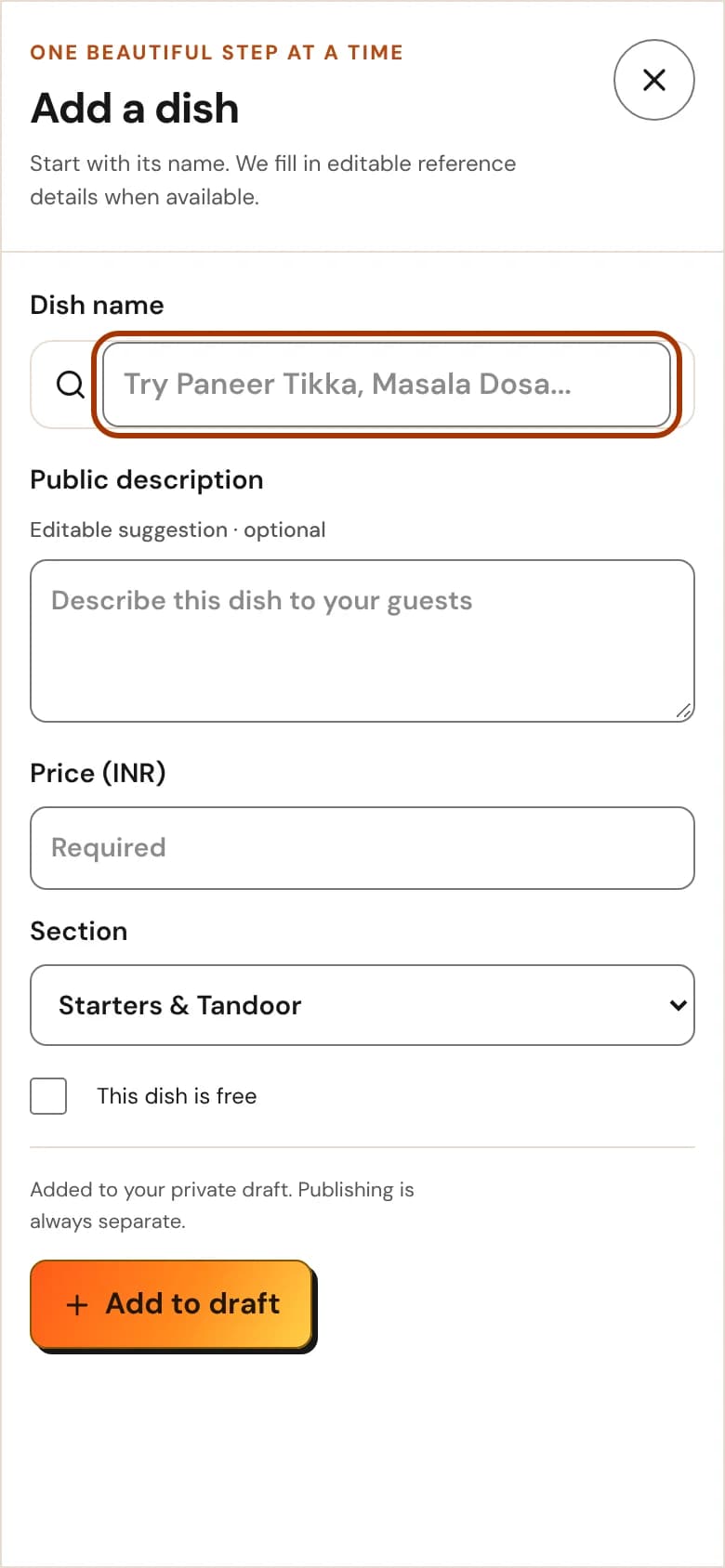
- 1Type the dish name, for example Paneer Tikka. A description is optional.डिश का नाम लिखिए, जैसे Paneer Tikka। डिस्क्रिप्शन लिखना ज़रूरी नहीं है।
- 2Enter the price. Then choose the Section it belongs to.कीमत भरिए। फिर वह Section चुनिए जिसमें डिश आती है।
- 3Click Add to draft. The dish is saved privately.Add to draft पर क्लिक कीजिए। डिश निजी तौर पर सेव हो जाती है।
STEP 4 · चरण 4
Import a printed menu from photosफ़ोटो से छपा मेन्यू जोड़िए
Already have a printed menu? Take photos of it and MenuMinute makes a draft for you to check.छपा हुआ मेन्यू पहले से है? उसकी फ़ोटो लीजिए। MenuMinute आपके चेक करने के लिए एक ड्राफ़्ट बना देगा।
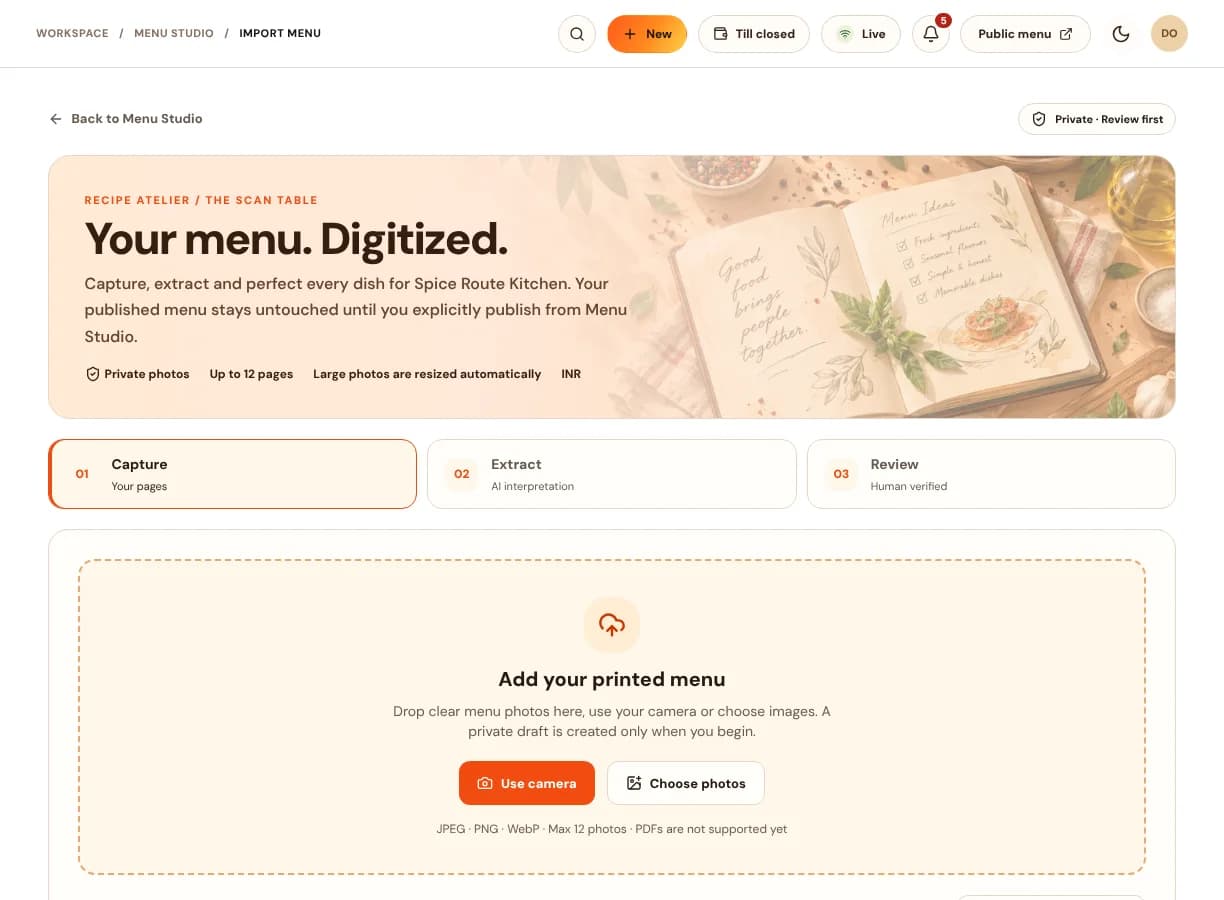
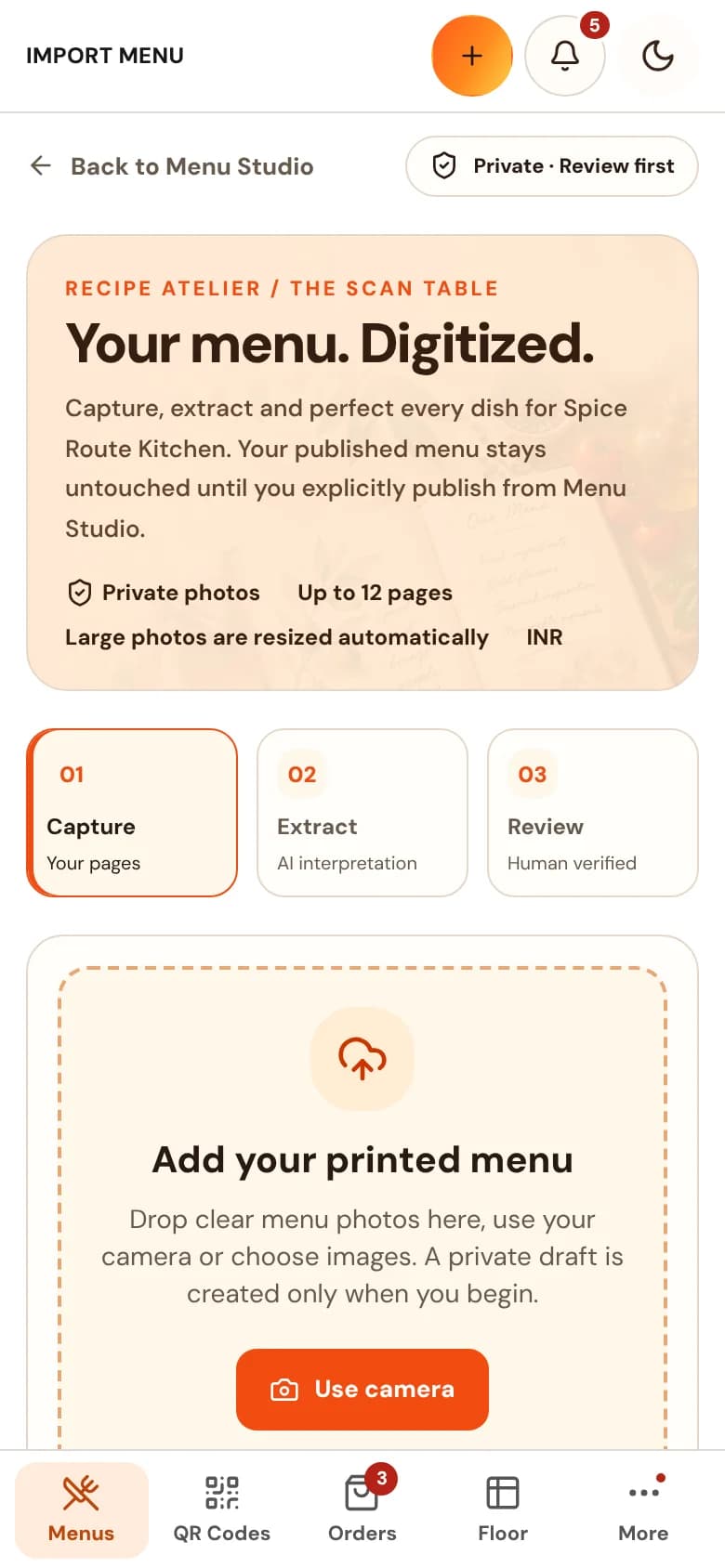
- •On Menu Studio, click Import from photos.Menu Studio में Import from photos पर क्लिक कीजिए।
- 1Click Use camera to take a photo now.अभी फ़ोटो लेने के लिए Use camera पर क्लिक कीजिए।
- 2Or click Choose photos to pick photos from your device. You can add up to 12.या अपने फ़ोन/कंप्यूटर से फ़ोटो चुनने के लिए Choose photos पर क्लिक कीजिए। ज़्यादा से ज़्यादा 12 फ़ोटो जोड़ सकते हैं।
- •Check every dish and price it found, and fix anything wrong. Nothing goes live until you publish.जो डिश और कीमत मिली, हर एक चेक कीजिए और गलती हो तो ठीक कीजिए। जब तक आप पब्लिश नहीं करते, कुछ भी चालू नहीं होता।
STEP 5 · चरण 5
Publish your menuअपना मेन्यू पब्लिश कीजिए
Publishing makes your latest menu visible to guests. Your QR codes keep working. They never change.पब्लिश करने पर ग्राहकों को आपका नया मेन्यू दिखने लगता है। आपके QR कोड वही रहते हैं, बदलते नहीं।
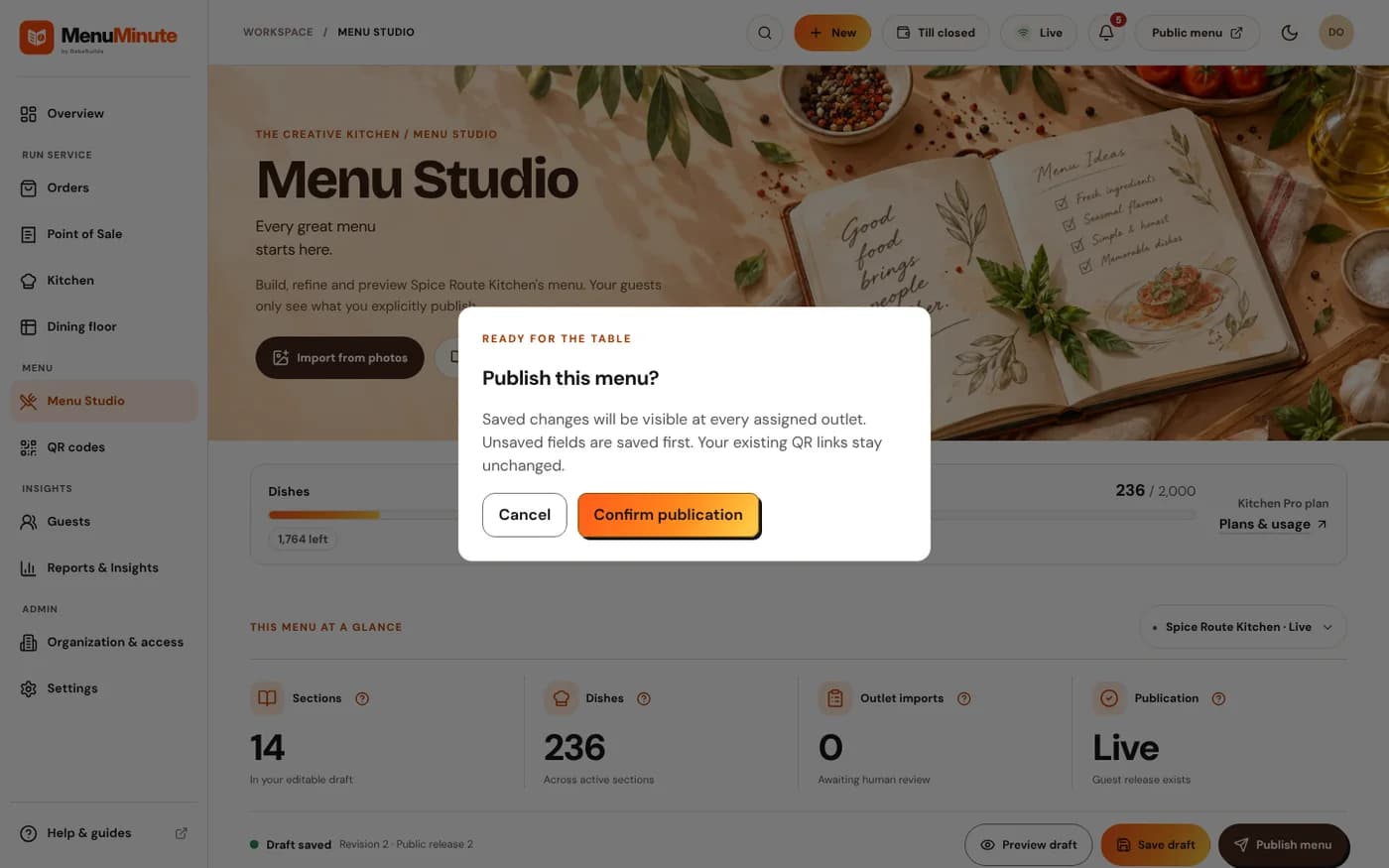
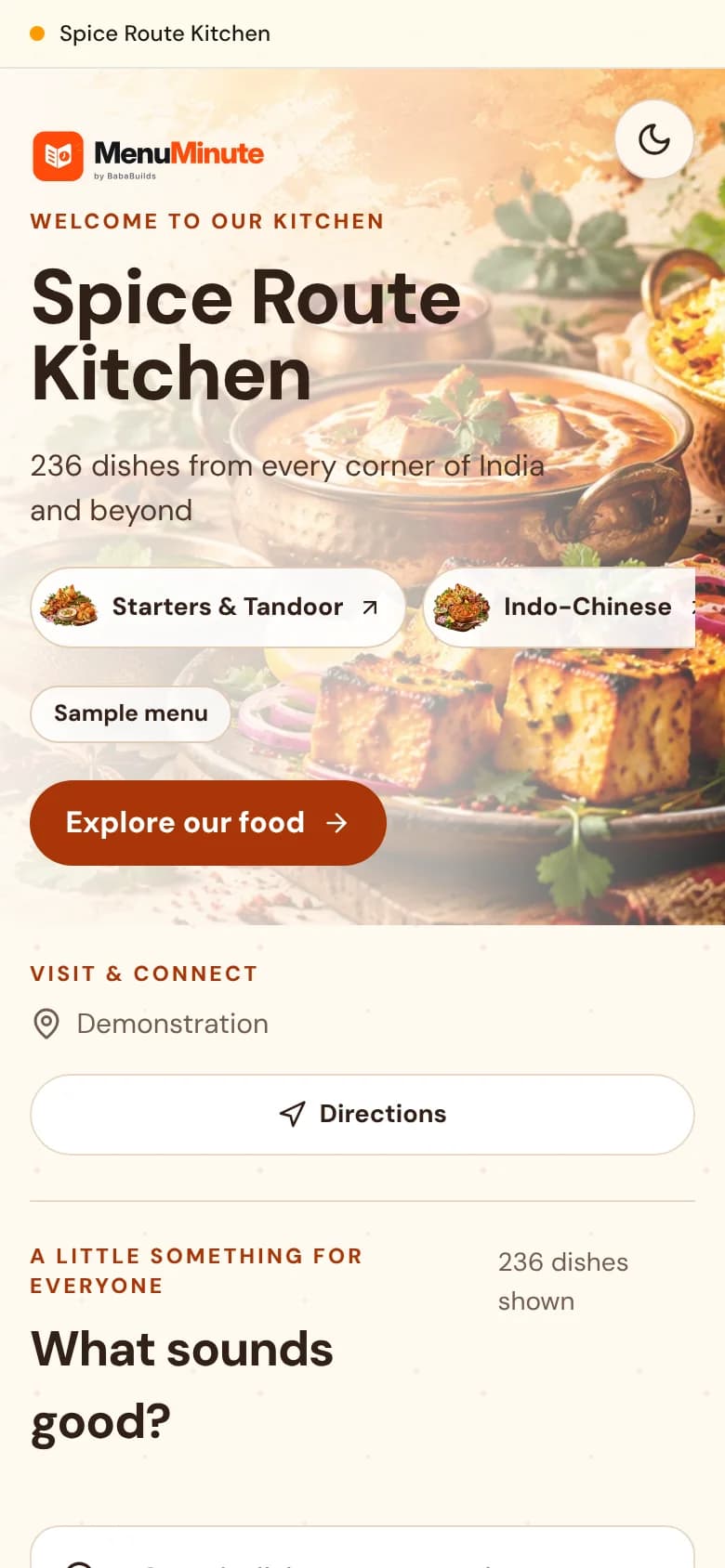
- •Click Preview draft to see how the menu will look.मेन्यू कैसा दिखेगा, यह देखने के लिए Preview draft पर क्लिक कीजिए।
- •Click the dark Publish menu button.गहरे रंग के Publish menu बटन पर क्लिक कीजिए।
- 1Click Confirm publication. The new menu is now live.Confirm publication पर क्लिक कीजिए। नया मेन्यू अब चालू है।
Before you move onआगे बढ़ने से पहले
- I can find Menu Studioमुझे Menu Studio मिल जाता है
- I can edit a dish and its priceमैं डिश और उसकी कीमत बदल सकता/सकती हूँ
- I can add a new dishमैं नई डिश जोड़ सकता/सकती हूँ
- I know that photos can make a draft for meमुझे पता है कि फ़ोटो से ड्राफ़्ट बन सकता है
- I can publish my menuमैं अपना मेन्यू पब्लिश कर सकता/सकती हूँ
If something looks wrongकुछ गड़बड़ लगे तो
- My guests can't see the new dish.ग्राहकों को नई डिश नहीं दिख रही।
- Did you publish? Changes stay private until you click Publish menu and then Confirm publication.क्या आपने पब्लिश किया? बदलाव तब तक निजी रहते हैं जब तक आप Publish menu और फिर Confirm publication पर क्लिक नहीं करते।
- I entered a wrong price.मैंने कीमत गलत भर दी।
- Click the pencil on the dish, fix the price, then publish again.डिश की पेंसिल पर क्लिक कीजिए, कीमत ठीक कीजिए, फिर दोबारा पब्लिश कीजिए।
- The photo import got a dish wrong.फ़ोटो इम्पोर्ट में कोई डिश गलत आ गई।
- That is why you review every dish first. Fix it there, or add the dish by hand.इसीलिए हर डिश पहले चेक करनी होती है। वहीं ठीक कर लीजिए, या डिश हाथ से जोड़ दीजिए।